IVR Builder
IVR builder: build the flow, publish the version
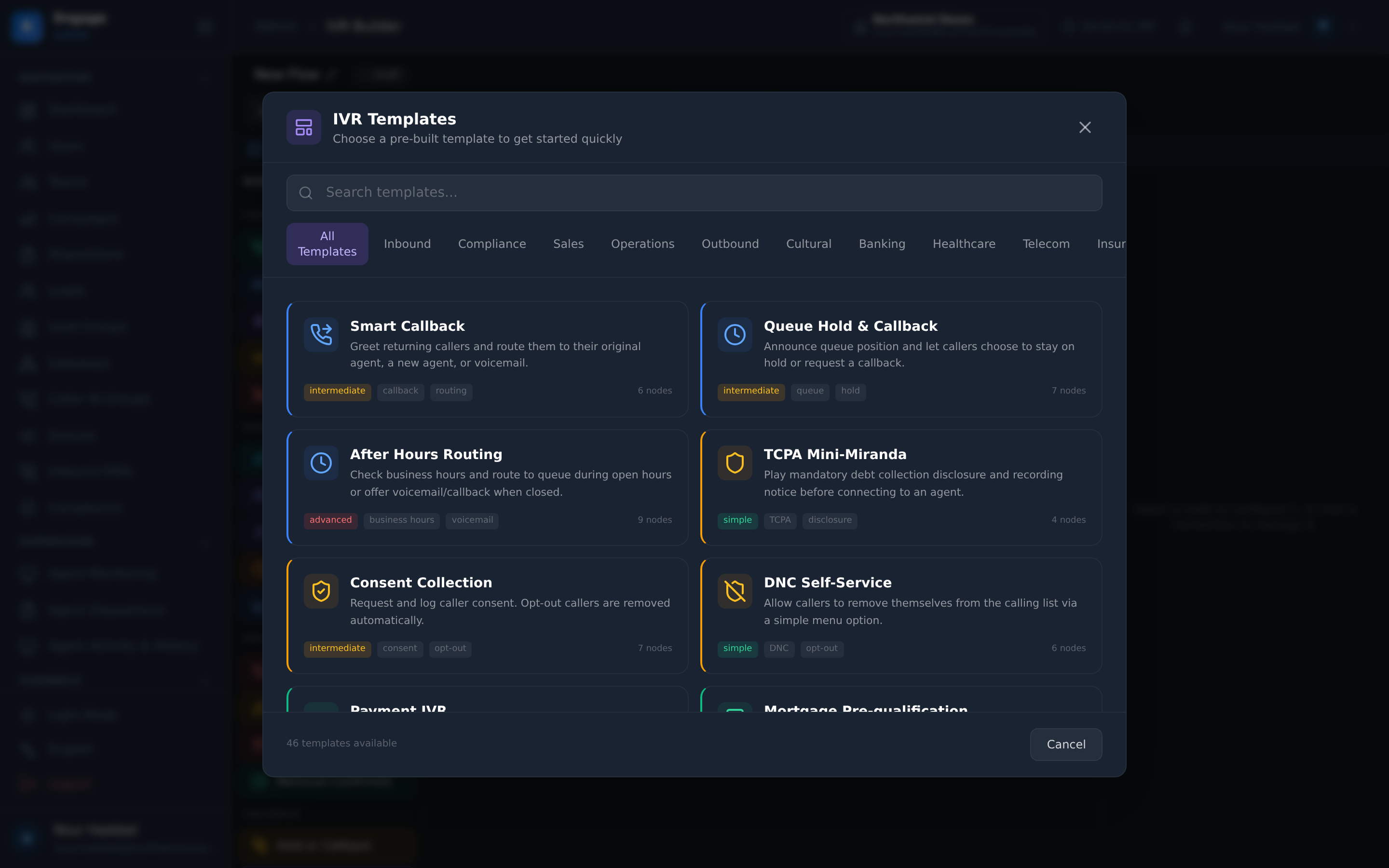
Forty node types on one canvas, including AI conversation, intent, sentiment and summary, booking self-service, CRM lookup, WhatsApp deflect and an A/B split with its own analytics. Publish as a version and export the diagram as SVG or HTML.
14-day free trial · free AI credit to try the AI voice agent · no card needed
Quick answer
What you get
Everything in one workspace
40 node types
Forty node types, all executable in the runtime. Call control, routing, self-service, AI, data and flow logic, dragged onto one canvas.
AI nodes
AI conversation for an open exchange in the middle of a flow, plus intent, sentiment and summary nodes that turn what the caller said into something the flow can branch on and the record can keep.
Smart greeting
A greeting that knows who is calling before the menu starts, so a known customer is not asked to identify themselves to a robot.
Language select and voice packs
Let the caller pick a language, then run the rest of the flow on the matching voice pack. A language is a branch of the flow rather than a separate flow to maintain.
Booking check and manage
Check a booking node reads the caller's appointment. Manage a booking lets them move or cancel it, without a queue and without an agent.
Data and integration nodes
CRM lookup pulls the caller's record into the flow. The HTTP node calls your own service with service authentication, so a routing decision can rest on your data.
WhatsApp deflect
Offer the caller a WhatsApp thread instead of a hold queue, and send it from inside the flow. The wait becomes a message they can answer when they are free.
Survey node
Hand the caller into a published survey from the flow, so the feedback is asked while the experience is still in the room.
Sub-flows
Build the identification steps once and call them from every flow that needs them. Fix them once too.
A/B split with analytics
Split callers between two versions of a branch and read the analytics on the split. The menu wording argument gets a measurement instead of a winner by seniority.
Templates and versions
Start from a template rather than an empty canvas, and publish as a version. What is live is a named version, not the last thing somebody saved.
SVG and HTML export
Export the flow as SVG or HTML. The diagram your auditor, your client or your new hire needs is one click, not a hand-drawn approximation in a slide.
Build
Forty node types, one canvas
The builder is a canvas of nodes. Forty node types cover call control, routing and queueing, caller self-service, AI understanding, data and integration, and flow logic, and every one of them executes in the runtime rather than sitting in a catalogue.
You do not start from nothing. Templates give you a working flow to change, and sub-flows let you build the identification or the language steps once and call them from everywhere else.
- 40 node types, all executable in the runtime
- Templates to start from rather than an empty canvas
- Sub-flows so a shared sequence is built and fixed in one place
- Language select and voice packs as branches of the same flow
Self-service that works
The caller gets an answer, not a queue
The nodes that matter most are the ones that end the call successfully without an agent. A smart greeting recognises the caller. A CRM lookup brings their record into the flow. Check a booking reads their appointment and manage a booking moves it.
When holding is the only option left, WhatsApp deflect offers a thread instead of music, and the AI conversation node can simply talk to the caller, with intent, sentiment and summary nodes recording what came of it.
- Smart greeting, CRM lookup and an HTTP node with service authentication
- Check a booking and manage a booking, without an agent
- AI conversation, intent, sentiment and summary nodes
- WhatsApp deflect instead of a hold queue, and a survey node at the end
Ship it
Publish a version. Prove which one is better.
A flow goes live as a published version, so what is answering your numbers has a name and a history rather than being whatever was last saved.
When the team disagrees about the menu wording, the A/B split node settles it: send callers down both branches and read the analytics on the split. Export the finished flow as SVG or HTML when someone outside the console needs to see it.
- Publish with versions, so the live flow is a named version
- A/B split with analytics on the split
- SVG and HTML export of the flow diagram
- Templates to clone a proven flow into a new tenant or a new number
How it compares
| A carrier IVR menu | The DialerBee IVR builder | |
|---|---|---|
| Building a flow | A support ticket and a wait | A canvas of 40 node types and a template to start from |
| Using your own data | Not possible | CRM lookup and an HTTP node with service authentication |
| Understanding the caller | Press 1 for sales | AI conversation, plus intent, sentiment and summary nodes |
| Appointments | Route to an agent | Check a booking and manage a booking inside the flow |
| A long queue | Music and hope | WhatsApp deflect to a thread the caller can answer later |
| Changing the wording | Change it and argue about it | A/B split with analytics on the split |
| What is live | Whatever was last edited | A published version, with the flow exportable as SVG or HTML |
Frequently asked questions
Do I need a developer to build an IVR flow?+
No. The builder is a canvas: you place nodes, connect them, configure each one and publish. Templates give you a working flow to start from, and sub-flows let you reuse a sequence you have already built. The HTTP node is there for the case where you do want your own service in the loop.
How many node types are there?+
Forty, and all forty execute in the runtime. They cover call control, routing and queueing, caller self-service including check a booking and manage a booking, AI understanding with the AI conversation, intent, sentiment and summary nodes, data and integration with CRM lookup and an HTTP node, and flow logic including sub-flows and the A/B split.
Can the flow use data from my own systems?+
Yes. The CRM lookup node pulls the caller's record into the flow, and the HTTP node calls your own service with service authentication. Either can feed the branch that follows, so a routing decision can rest on a balance, an order status or anything else your systems know.
What can the AI nodes do inside a flow?+
The AI conversation node holds an open exchange with the caller in the middle of an otherwise deterministic flow. The intent node turns what they said into a branch. The sentiment node tells you how the call is going. The summary node writes the exchange down so the record keeps it and the next person does not start from nothing.
Can a caller change an appointment without reaching an agent?+
Yes. Check a booking reads the caller's appointment and manage a booking lets them move or cancel it from the flow itself. The smart greeting can identify them first, so they are not asked to key in a reference they do not have to hand.
How do I move callers off hold?+
The WhatsApp deflect node offers the caller a WhatsApp thread instead of a queue and sends it from inside the flow. They answer when they are free, and the conversation lands in the same inbox your agents already work in.
How do I know a change to the menu was an improvement?+
Use the A/B split node. It sends callers down two versions of a branch and reports analytics on the split, so the wording that ends more calls successfully wins on evidence. A flow goes live as a published version, so you always know which version produced which numbers.
Does the IVR handle more than one language?+
Yes. A language select node lets the caller choose, and the rest of the flow runs on the matching voice pack. Languages are branches inside one flow rather than a separate flow per language, which is the difference between maintaining one thing and maintaining eleven.
Walk a live IVR flow node by node, on a demo tenant
A 30-minute walkthrough on a demo tenant, in English or Arabic.