Lead Management
Lead management: the list is the campaign, so treat it like one
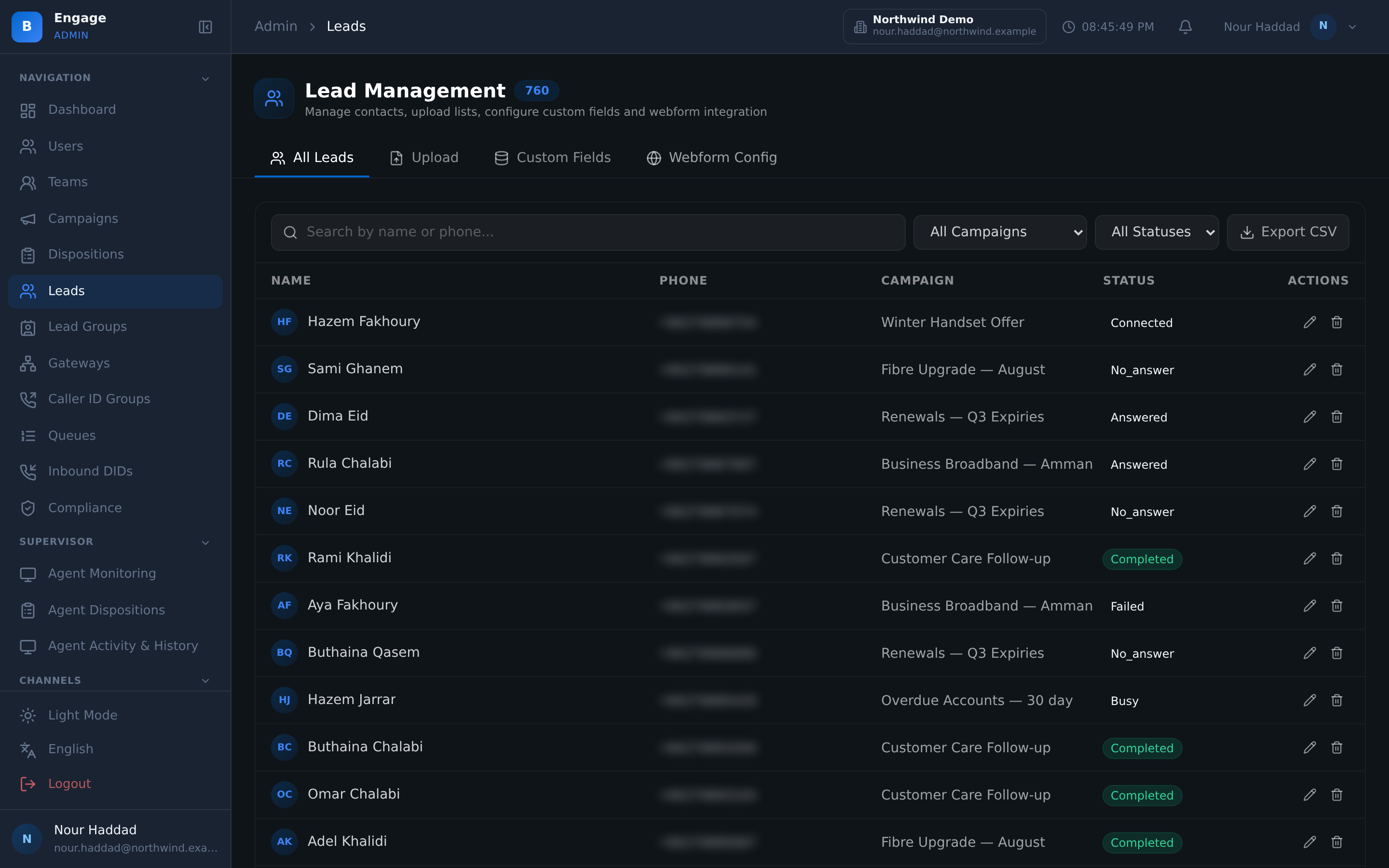
Leads with your own custom fields, CSV and XLSX import with a preview and a do-not-call scrub, a contact state machine with lead scoring and retry rules, disposition codes you design with hotkeys, and callbacks that land in an agent's queue.
14-day free trial · free AI credit to try the AI voice agent · no card needed
Quick answer
What you get
Everything in one workspace
Leads with custom fields
Add the fields your business actually works from. A collections file and a salon file are not the same record, and neither should be squeezed into a fixed schema.
Lead groups
Group leads so a campaign dials a defined set rather than a whole database, and so the same list can be reused without being copied.
CSV and XLSX import with preview
Import from CSV or Excel and see a preview of how the columns mapped before anything is written. You fix a bad mapping on the screen, not in the dialled list.
DNC scrub on import
Do-not-call scrubbing runs on import, so suppressed numbers never enter the list. Compliance-supporting controls work best before the load, not after the complaint.
Contact state machine
Every contact moves through a defined state machine with outcome columns, so a lead's position is a state you can query and not a guess from its call history.
Lead scoring
Leads carry a score, so the list can be worked in an order that reflects what is worth calling rather than the order it was uploaded in.
Max attempts and retry delay
Set how many times a contact may be attempted and how long to wait between attempts, then let the dialer respect it without anyone policing the list.
Reset stale contacts
Reset contacts that have gone stale, so a list that stalled halfway can be brought back into play deliberately instead of being re-imported.
Disposition codes you design
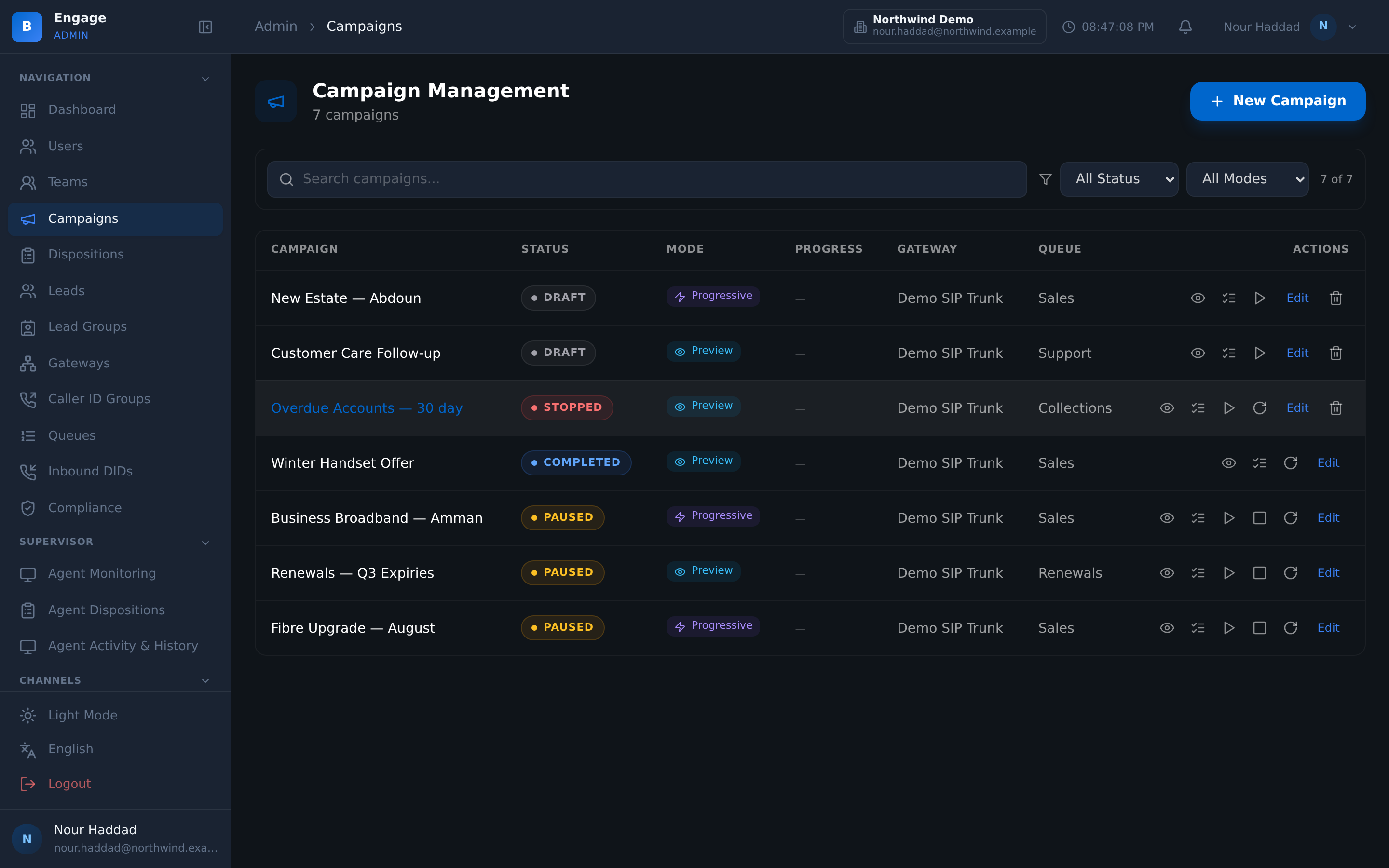
Each code carries a category, an icon, a colour, a hotkey and a favourite flag. Agents hit a key; you get a clean taxonomy out the other end.
Auto-disposition rules and usage stats
Rules set dispositions automatically where the outcome is not in doubt, and usage stats show which codes are actually being used.
Callbacks
Callbacks are scheduled from the disposition popup, listed per agent as pending, and can also be requested by the caller through the IVR.
Webform capture and CRM webhook
A webform drops straight into leads, and a CRM webhook pushes out, with a test button so you find out it works before a real lead depends on it.
Import
Scrub it before you dial it
Import accepts CSV and XLSX and shows you a preview of the mapping first. That preview is the point. Most bad campaigns start with a column that landed in the wrong field and nobody looked.
DNC scrubbing runs on import, so suppressed numbers do not enter the list at all. Cleaning a list after the fact is a report; cleaning it at the door is a control.
- CSV and XLSX import with a preview of the column mapping
- DNC scrub applied on import, before anything is dialable
- Custom fields carried through the import
- Leads organised into lead groups a campaign can target
Dispositions
A hotkey for the agent, a taxonomy for you
Disposition codes are yours to design. Each one carries a category, an icon, a colour, a hotkey and a favourite flag, so an agent ends a call with a keypress instead of hunting through a dropdown.
Auto-disposition rules cover the outcomes that are not in doubt, and usage stats show which codes are actually being used. A code nobody picks is a code that should not be on the screen.
- Category, icon, colour, hotkey and favourites on every code
- Auto-disposition rules for unambiguous outcomes
- Usage stats per code, so the list stays honest
- Contact state machine and outcome columns updated from the disposition
Callbacks
A promise with a time on it
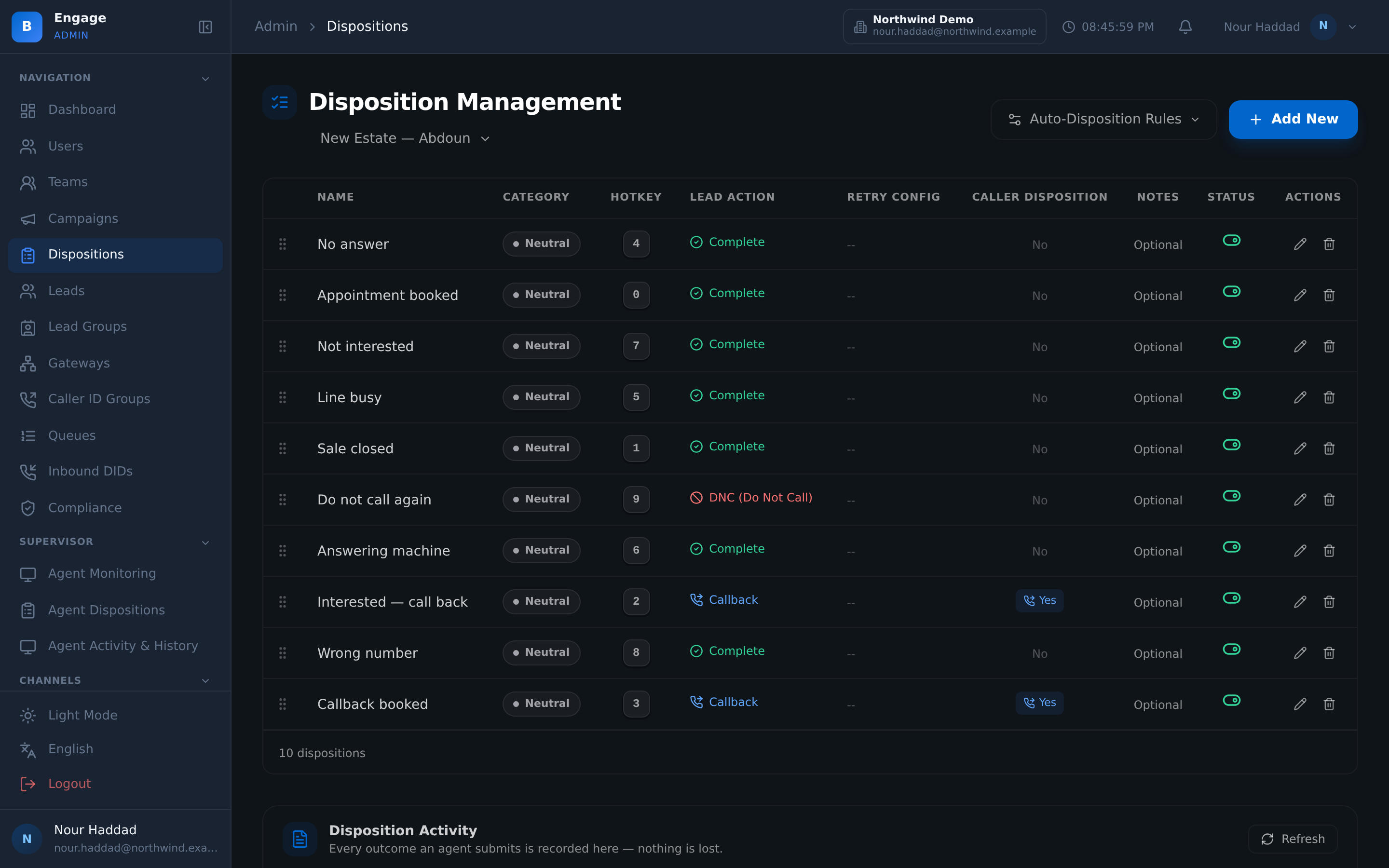
Call me back at four is worth nothing unless it lands somewhere. In DialerBee the agent schedules the callback from the disposition popup, at the moment the customer says it, and it appears in that agent's pending callbacks.
Callers can also request a callback through the IVR rather than waiting in a queue, and those requests arrive in the same place. Beside them the lead timeline in the agent desktop shows what has already been said to this person, so the callback does not start from zero.
- Callbacks scheduled from the disposition popup as the call ends
- Pending callbacks listed per agent
- IVR-requested callbacks from callers who did not want to hold
- Lead timeline in the agent desktop, so history is on screen before the call connects
How it compares
| A contact list in a dialer | DialerBee lead management | |
|---|---|---|
| The record | Name and number | Leads with your own custom fields, organised into lead groups |
| Loading it | Upload and hope | CSV and XLSX import with a mapping preview and a DNC scrub on import |
| Where a lead is | Inferred from call logs | A contact state machine with outcome columns, plus a lead score |
| Retry behaviour | Dial until someone stops it | Max attempts and retry delay, with a reset for stale contacts |
| Dispositions | A fixed dropdown | Your own codes with category, icon, colour, hotkey, favourites, auto-rules and usage stats |
| Callbacks | A note in a notebook | Scheduled from the disposition popup, pending per agent, and requestable from the IVR |
Frequently asked questions
What is Lead Management in DialerBee?+
It is where the people you call live. Leads carry your own custom fields and sit in lead groups. They are imported from CSV or XLSX with a mapping preview and a do-not-call scrub, moved through a contact state machine with outcome columns, scored, and worked under max attempts and retry delay rules.
How do I import a list?+
Upload a CSV or an XLSX file and review the preview, which shows how each column mapped to a lead field or a custom field. DNC scrubbing runs on import, so suppressed numbers do not enter the list at all.
Can I add my own fields to a lead?+
Yes. Custom fields are part of the lead record, and they come through the import and appear in the agent desktop. A collections file and a salon file need different fields, so the schema is not fixed.
How does DialerBee stop a contact being called too often?+
Each list is worked under a max attempts setting and a retry delay, and the contact state machine records where each contact has got to. Contacts that have gone stale can be reset deliberately rather than re-imported.
Can I design my own disposition codes?+
Yes. Each code carries a category, an icon, a colour, a hotkey and a favourite flag, so agents disposition with a keypress. Auto-disposition rules handle outcomes that are not in doubt, and usage stats show which codes are actually being picked.
How do callbacks work?+
The agent schedules a callback from the disposition popup at the end of the call, and it appears in that agent's pending callbacks. Callers can also request a callback through the IVR instead of holding, and those requests land in the same list.
Can leads come in from my website?+
Yes. Webform capture writes straight into leads. A CRM webhook pushes leads and outcomes out to your own system, and it has a test action so you can prove it works before a real lead depends on it.
What does the agent see before the call connects?+
The lead record with its custom fields, and the lead timeline showing what has already happened with this person. The agent starts from the history rather than from a phone number.
Bring a real list and see it imported, scrubbed and scored
A 30-minute walkthrough on a demo tenant, in English or Arabic.