White-Label
White-label contact center: your brand from the login page
Thirty branding fields, a contrast-checked colour scale, your logo, favicon and background, and a custom domain verified by DNS TXT. Partner admins own the tenants they create, and a six-step wizard gives every new customer its own extension range and caller IDs.
14-day free trial · free AI credit to try the AI voice agent · no card needed
Quick answer
What you get
Everything in one workspace
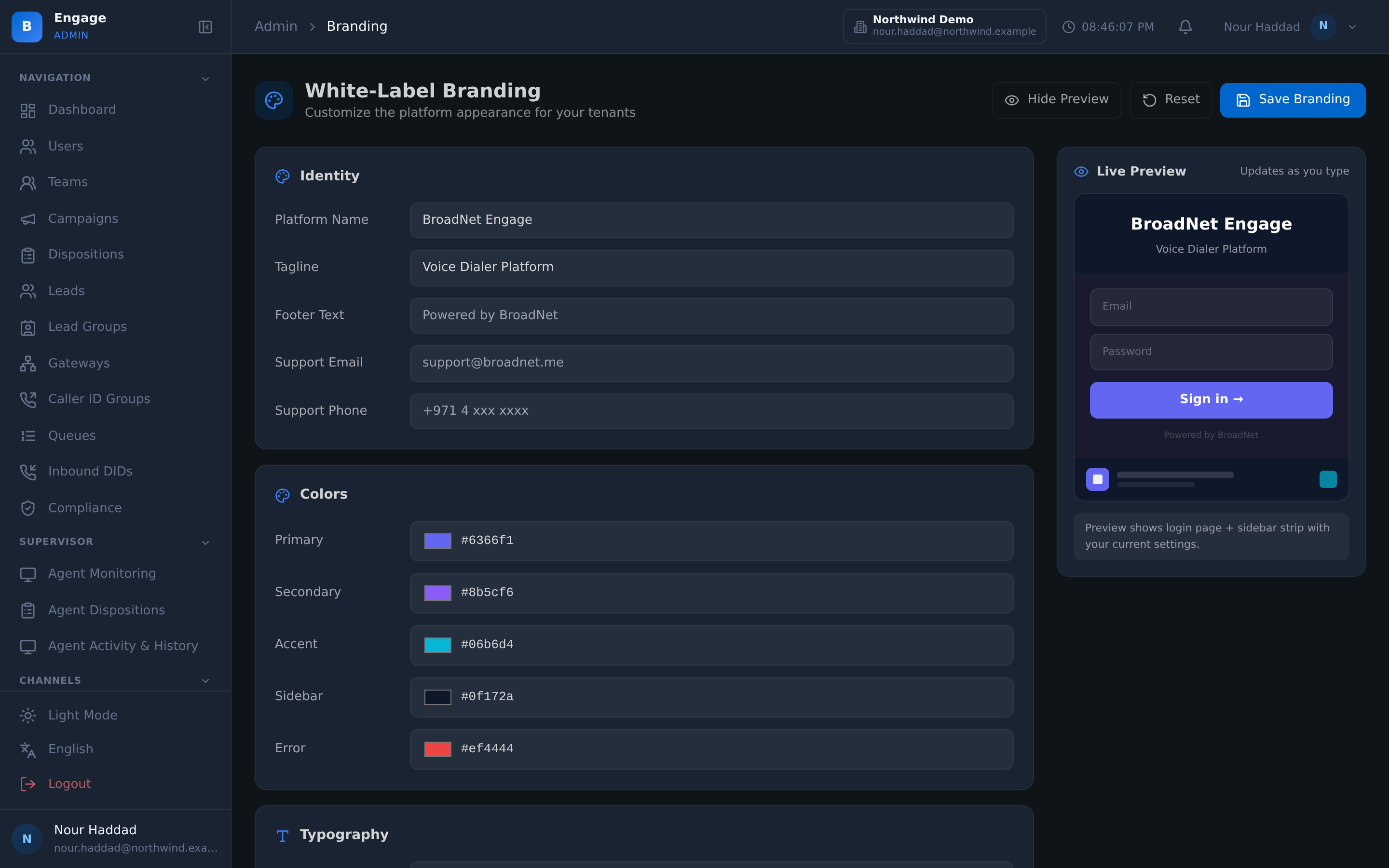
30 branding fields
Thirty fields, not a logo slot. Colours, type, names, imagery and the details that give a platform away are all yours to set.
Colour scale with contrast validation
Set a colour scale and the platform checks the contrast. A brand palette that makes small text unreadable is caught before your customers meet it.
Logo, favicon and background
Set the logo, the favicon and the background on the branding page. Today the console shows your platform name and initial; displaying the uploaded files inside the console is planned.
Live preview
See the branded screen as you change it, so the palette argument is settled by looking rather than by publishing and hoping.
Custom domain with DNS TXT
Run the platform on your own domain, verified by a DNS TXT record you place. Verification is proof of control, not a form you tick.
Public branding endpoint
A public endpoint serves the branding, so the login screen is already yours before anyone has signed in.
Partner-admin ownership
A partner admin owns the tenants they create. Your customers are yours to provision, configure and support without asking anyone.
Six-step onboarding wizard
A six-step wizard takes a new customer from nothing to a working tenant, in the same order every time, so onboarding does not depend on who did it.
Extension ranges and caller IDs
Every tenant gets its own extension range and its own caller IDs. Defaults collide, and a shared trunk is not a caller ID, so the wizard sets both.
AI usage billing per tenant
AI usage is metered and billed per tenant, so the AI a customer used is attributable to that customer rather than sitting in one unexplainable total.
The brand
Thirty fields, and a contrast check on your palette
White-labelling usually means a logo in the corner and someone else's blue everywhere else. Here it is thirty branding fields, a full colour scale, and uploads for the logo, the favicon and the background.
The colour scale is validated for contrast, so a palette that renders small text unreadable is caught while you are still setting it. A live preview shows the branded screen as you work, and a public branding endpoint serves it, which is why the login page is already yours before anyone signs in.
- 30 branding fields
- Colour scale with contrast validation
- Logo, favicon and background upload
- Live preview while you change it
- Public branding endpoint, so the login screen is branded pre-authentication
The domain
Your address, and tenants that belong to you
The platform runs on your own custom domain, verified by a DNS TXT record you place yourself. That verification is the point: it proves control of the domain rather than accepting a claim.
Ownership goes further than the address. A partner admin owns the tenants they create, so provisioning, configuration and support for your customers stay with you rather than routing through someone else's helpdesk.
- Custom domain, verified by a DNS TXT record
- Partner-admin ownership of the tenants you create
- Branding served publicly, so every screen is yours from the first one
- Your customers deal with your brand and your support
Onboarding a customer
Six steps, in the same order every time
The onboarding wizard takes a new customer from nothing to a working tenant in six steps. The value of a wizard is not speed, it is that step four happens even when the person doing it is new.
Two of those steps matter more than the rest. Each tenant gets its own extension range and its own caller IDs, because platform defaults collide when two tenants get the same ones, and a shared trunk is not a caller ID. AI usage is then metered per tenant, so what a customer consumed is attributable to that customer.
Once you know how many tenants and seats you plan to onboard, the free reseller economics calculator turns that count into a margin projection.
- Six-step onboarding wizard for a new tenant
- A dedicated extension range per tenant
- Its own caller IDs, not a shared trunk
- AI usage metered and billed per tenant
How it compares
| A reseller badge on someone else's product | DialerBee white-label | |
|---|---|---|
| How much you can brand | A logo slot | 30 branding fields and a full colour scale |
| Readability of your palette | Your problem | Contrast validation on the colour scale |
| The login page | Their brand until sign-in | Yours, served by a public branding endpoint |
| The address | A subdomain of theirs | Your own domain, verified by DNS TXT |
| Who owns the customer | The vendor | The partner admin who created the tenant |
| Provisioning a customer | A ticket and a wait | A six-step wizard, with its own extension range and caller IDs |
| AI cost per customer | One total you cannot split | Metered and billed per tenant |
Frequently asked questions
What does white-label mean on DialerBee?+
The platform runs on your domain, under your brand, with your customers as tenants you own. Thirty branding fields, a colour scale, the logo, favicon and background, and a public branding endpoint mean the screens are yours from the login page onwards rather than from the moment someone signs in.
How much of the interface can I actually change?+
Thirty branding fields, plus uploads for the logo, the favicon and the background, and a full colour scale. A live preview shows the result while you are still choosing, so the palette is settled by looking at it rather than by publishing it to customers first.
What stops me choosing colours that are unreadable?+
Contrast validation on the colour scale. It is easy to pick a brand palette that looks right on a slide and makes small text on a dense agent screen unreadable for a whole shift. The platform checks the contrast so that is caught while you are setting it.
Can I run the platform on my own domain?+
Yes. Add your custom domain and verify it with a DNS TXT record you place yourself. The verification step is deliberate: it proves you control the domain rather than taking a claim at face value.
How is the login page branded before anyone signs in?+
A public branding endpoint serves the branding for a tenant without authentication. On your verified custom domain, that is what lets the login screen, the first thing every one of your customers sees, already carry your platform name. Showing your uploaded logo, colours and favicon inside the console is planned.
Who owns my customers' tenants?+
You do. Tenants created by a partner admin belong to that partner admin, so you provision, configure and support your own customers. Your customer's relationship is with you.
What happens when I onboard a new customer?+
A six-step wizard takes the tenant from nothing to working. Two steps matter more than the others: the tenant gets its own extension range and its own caller IDs. Platform defaults collide when two tenants share them, and a shared trunk is not a caller ID, so both are set per tenant rather than inherited.
How do I charge my customers for the AI features?+
AI usage is metered and billed per tenant. That per-tenant attribution is what makes reselling AI possible: you can see which customer consumed what, rather than receiving one total you have no way to split fairly.
See the platform under your brand, on a demo tenant
A 30-minute walkthrough on a demo tenant, in English or Arabic.